Objectives for this site
After going through this session, you would be able to:
- explain the concept of website planning
- define the principles of Website Designing
- define Website its various types and components
- describe website Hosting and its types
- get acquainted with domain name registration
- host a sample website into a free web hosting server
WHAT IS A WEBSITE?
A Website is a collection of documents written in the HTML code for an individual, a business house or any other organization. It is typically dedicated to some particular topic or purpose. Generally the difference between a website and magazine is small. Based on their functionality, there are two types of website, Static Website and Dynamic Website. In static website contents are not expected to change frequently whereas in dynamic website contents are changing frequently.
COMPONENTS OF A WEBSITE
Basic Components of any website are as follows:
Home Page and site wide template design to ensure an attractive, functional and consistent appearance of your website.
Integrated site navigation to provide clear and consistent access to your site’s content.
Look and feel of your website, including colors, text and graphics, as well as the way it functions.
A Logo: to be displayed in the left corner of each page of your website.
A site map to provide a list of all pages on your site.
Website Search features allowing user to search the website for content relevant to their specific interests.
About page that includes:
- A complete description of you and / or your company
- A complete description of you and / or your company
- Your website and / or company objectives
- Your name, address, phone numbers and e-mail addresses
Feedback: that facilitates the customers to ask some queries about your Products and Services.
A domain name: Your
address on the internet, what people type into their browser to find you. You choose a word or phrase (Example:- mywebsite) and an extension
(Example: .com, .net, .edu), your domain name could be mywebsite.com
Web Hosting: The
physical place your website resides; includes the computer (called a server) as well as the
connection to the Internet and the technology that makes your website work.
Copyright: Displaying your copyright information at the bottom of each page. Your copyright might look like this: Copyright @ Year CompanyName.
Get a website template

WEBSITE PLANNING
Planning is the most important part of building a website. Before designing a website, it is necessary to do proper planning as we do in the case of building a house. If you start building your house without giving a thought of planning, the house may end up into an uncomfortable dwelling. Therefore, for building a good website proper planning is required.
The basic steps that help in planning a website are:
- Define your target audience
- Organize your concepts and materials
- Create a directory structure (also called site map)
- Create a sketch of the pages you intend to create
- Design and refine the look and feel of the site
Define your Target Audience
Your site should facilitate the information or services to visitors the way they are looking for. The keys to successfully communicating with your audience are first to identify who they are and then anticipate their reaction to the various elements of your web site. You can tailor almost every aspect of your web site to your target audience - from the way you organize information to the kinds of fonts and images you use. You need to consider the following points for meeting the above said objectives.
- The viewer’s background and previous experience
- Their interest and tastes
- The reason why they are visiting your site
- What is their general age
Organize your Concepts and Materials
You should be clear about the aim of creating your site, whether the aim of the site is:
- To inform
- To promote a product
- To educate audience
- To entertain the audience
Hot Online Jobs

Your vision of creating the web site needs to be well defined. Once the goals are defined, organize all your materials and put together any other related documents and pictures you want to work with.
Create a Directory structure
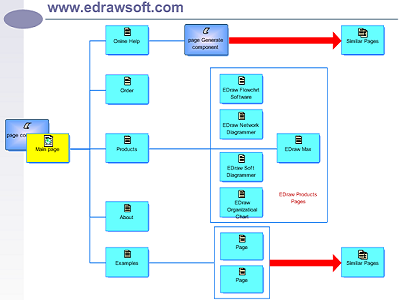
If you think that the site will contain very few files then you can store all of them in just one directory. But if the site is going to be very large and complex, then you will need to organize files into separate directories and sub-directories. Developing a logical directory structure is an essential part of planning your web site. You can have a subdirectory for sound clippings.
Create a Sketch of the web pages You may like to create a drawing of web pages
Fig. 6.1 a sketch of a simple website.
After setting up a general site plan and directory structures, your contents may fall into certain types. It may be possible to work within various pre-designed templates available on the web designing tools such as Macromedia Dreamweaver.
Develop a Look and Feel
The term Look and Feel means the overall representation of your site. It is the combination of colour, graphics, type and text that help to convey your meaning with style and impact.
Some of the factors you can take into consideration to improve the look and feel of the web site are:
- Space and Balance: Everything should look proportionate and proper.
- Color: The colors should look pleasant to the eyes.
- Font type and size: Type face of the text and size of the text in the Web pages should be comfortable to read and make the matter easy to understand.
- Textures: Background graphics or textures can be annoying while reading text. So be very careful and selective.
- Special Effects: Multimedia can be added to your site to make your site appealing. More animation, graphics, sound may cause delay while accessing through a browser.
- Consistency: Using a single color scheme throughout is a good way to achieve consistency.
Make landing page that attract customers

WEB PAGE DESIGNING
Following are some principles about web page designing which will help you to design an effective web page.
- Present your web page in such a way that the user gets impressed within the first few seconds of visit.
- Keep on updating web pages on regular basis by providing fresh and latest information.
- Keep your web pages focused. Don’t show everything on one page, use separate pages for separate topics.
- Make sure that the features used in the web site are compatible to all browsers.
- Ensure that buttons and links in the web site behave as expected.
- Use compressed images so that web page gets quickly loaded.